UUID generator
UUID labels are part of the Plus plan and above; on Basis the page shows that the feature is not included in the current plan.
UUID labels are QR codes you stick on inspection items. Code scannen in the app then jumps straight to the element — faster than any search.
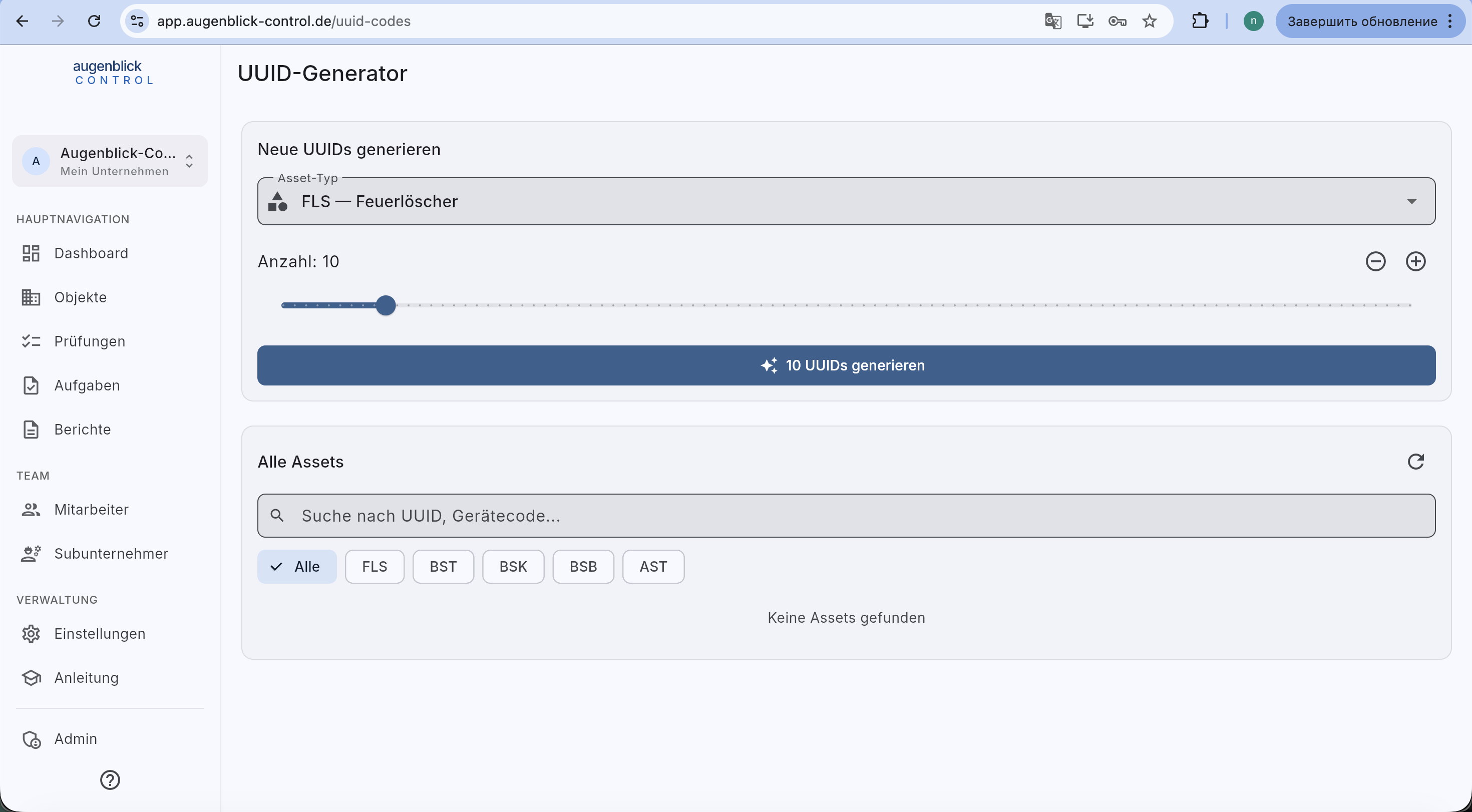
Generate UUIDs
- Choose asset type — FLS / BST / BSK / BSB / RWM / AST. Determines the prefix in the UUID.
- Quantity — slider (1–500) or
+/−. - Generate — button writes the codes to the system.
- Then print labels via the "UUID labels" report (A4 sheet with multiple QR codes, ready to stick).
All assets
Below the generator: searchable list of all already-generated UUIDs filterable by category. Shows which labels are assigned and which are still free.
Field workflow
- Print UUIDs before the tour — e.g. 50 labels of mixed categories.
- On site: stick a label on the device, then Code scannen in the app — the "Create element" dialog opens with the UUID pre-filled.
- Enter Stammdaten + location, Save.
Tip: Print waterproof or add a protective overlay — labels in boiler rooms / sanitary areas fade after 1-2 years otherwise.
What's next
- Create a new element
- Start a new inspection — scanning the code is the fastest path