Manage tasks
Tasks are assignments with a deadline and status — e.g. "Re-check this fire door". They link team members to specific elements / buildings.
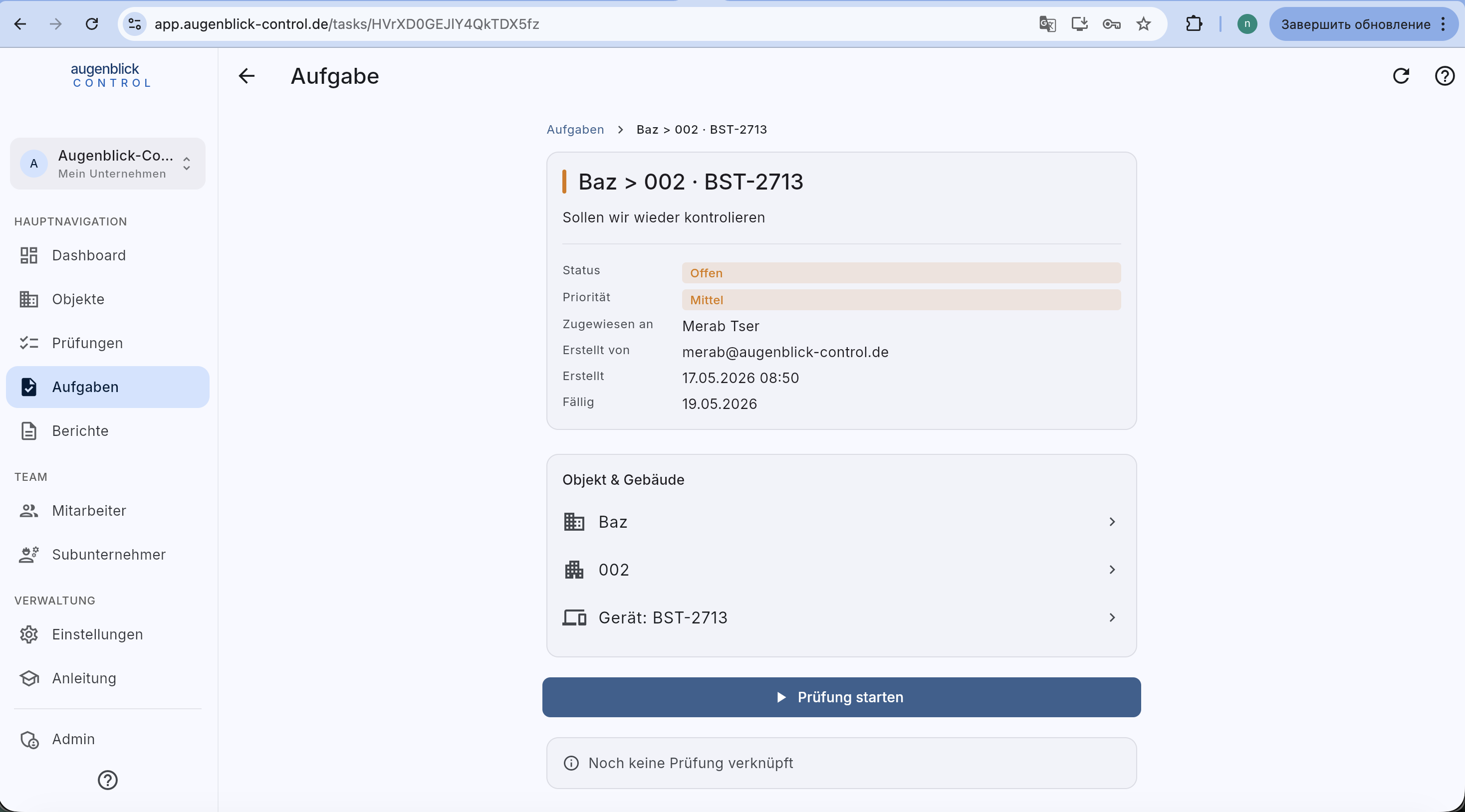
Detail page
- Status — Offen / In Bearbeitung / Erledigt.
- Priority — Low / Medium / High / Critical.
- Assigned to + Created by.
- Due — date after which the task becomes overdue.
- Object & Building — quick access (tap arrow → detail).
- Device — linked element (optional).
- Prüfung starten button — opens the inspection form pre-filled.
Create a new task
On the list page + Neue Aufgabe (or from an element detail → … menu → "Assign as task").
Required: title, assignee, due date. Optional: description, priority, element link.
Workflow
- Team leader creates task → picks assignee + deadline.
- Employee gets push / email.
- Employee opens the task → Prüfung starten → form is pre-filled.
- After submit → task is automatically erledigt.
Tip: Tasks are ideal for re-checks after defect resolution. Create a task right from the defect list — due in 14 days, priority high.