Dashboard at a glance
The Dashboard is your daily overview. It shows due inspections, open defects and quick actions.
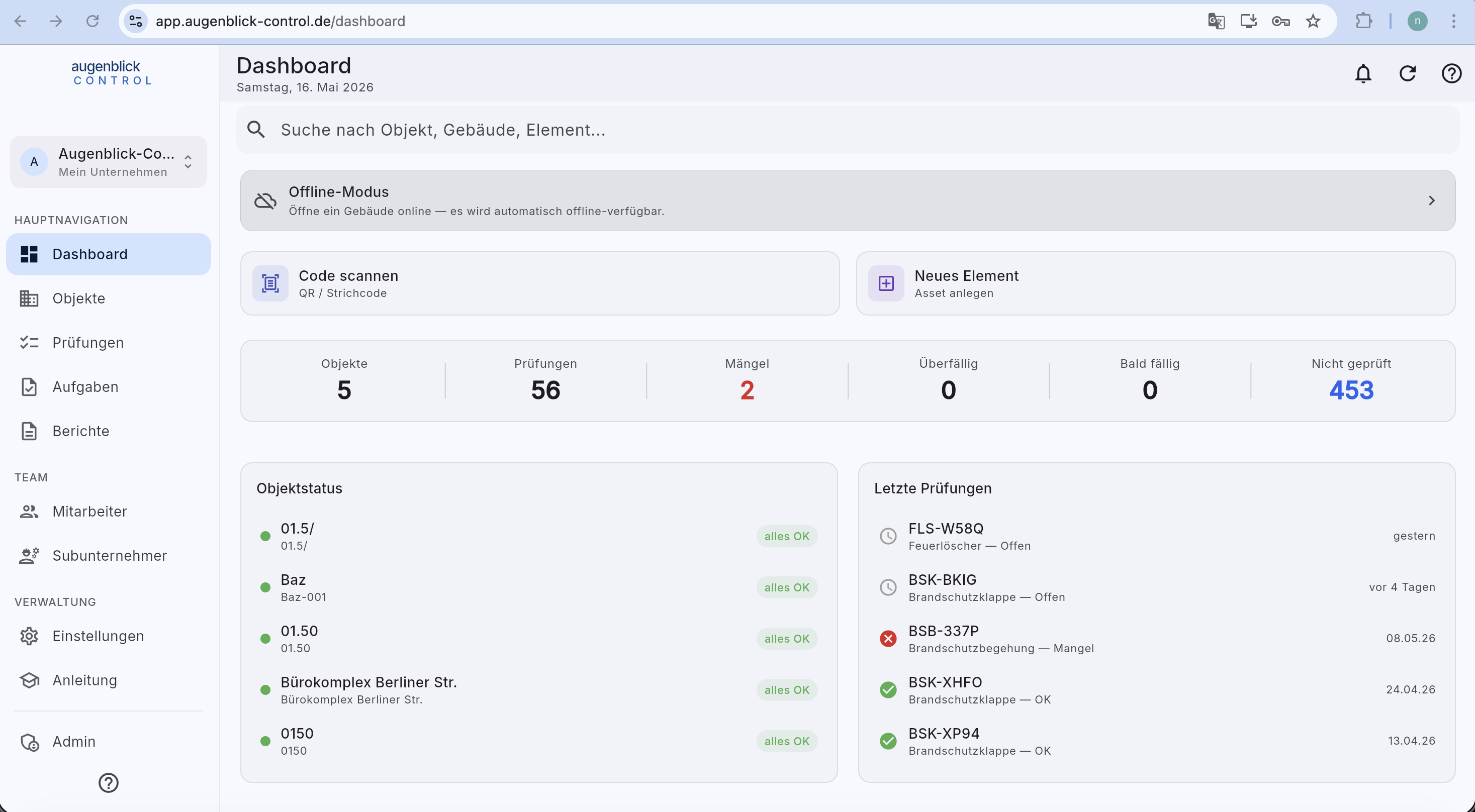
What you find here
- Global search (top) — finds any Objekt, building or element. 2 characters suffice.
- Offline Mode card — tap a building to make it offline-available.
- Scan code — scan QR / barcode on the inspection item.
- New element — quickly create an inspection item.
- 6 key figures — Objekte, Inspections, Defects, Overdue, Due soon, Not inspected. Every number is tappable and filters the list.
- Object status (left below) — traffic-light overview of your properties.
- Last inspections (right below) — the five most recently submitted inspections.
Navigation
Left side: main areas (Dashboard, Objects, Inspections, Tasks, Reports, Employees, Subcontractors, Settings, Guide).
Top right: bell (notifications), refresh, question mark (help).
Tip: The search at the top is faster than any navigation. Type 3 letters of an element code to jump straight to the inspection.
What's next
- Create Objekt — set up your first property
- Create new inspection — record your first inspection
More search results
The dashboard shows a preview. If it is incomplete, Search all elements opens the same query in the device list. Online, the server returns matching elements in pages of 50; load further results as needed. An empty intermediate page does not mean there are no matches.
Download the complete building separately for offline use. Online search does not download all elements for every query.